
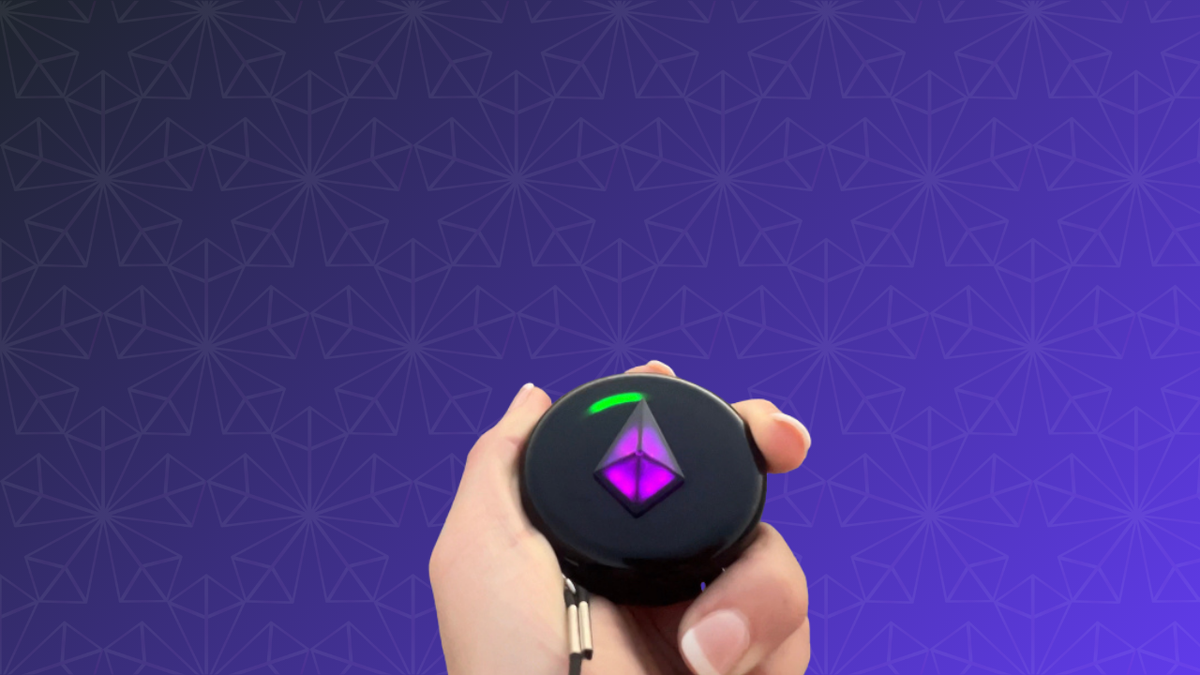
Compass Mode is the friend-finding mode of the Totem Compass. Hold your Totem horizontally and it switches into Compass Mode on its own: each colored light around the edge is a Bonded friend, pointing in their direction. Follow the light, and it leads you to them.
If you're new here: the Totem Compass is a screen-free wearable that helps you find your friends without relying on cell service, Wi-Fi, or apps. Totems combine satellite positioning, a peer-to-peer radio protocol, and our Unity Mesh Network™, so you can find your friends by simply following the pretty lights.
The Totem Compass has two main modes: Compass Mode for finding friends, and Vibe Mode, the sound-reactive light show it does while hanging on your chest. This guide covers everything you need to know about Compass Mode on Version 5.0: how to enter it, connecting to satellites, calibration (now mostly automatic), and how to read your Bond Lights. For the technology underneath, see how the Totem Compass works.
This video tutorial was recorded before Version 5.0, so it doesn't show Auto-Calibration.
How Do You Enter Compass Mode?
We designed the Totem Compass to know exactly when you are ready to find your friends.
The Totem Compass has an IMU, or Inertial Measurement Unit. An IMU measures motion and orientation, which is what gives the Totem its tilt recognition. A popular example of a device with an IMU is the iPhone, which lights up when you tilt it toward your face.
The IMU lets your Totem know when you're holding it horizontally. To enter Compass Mode, all you have to do is pick up your Totem and hold it flat. That's all it takes to tell your Totem you're ready to find your friends. It's that simple!
You'll know your Totem is in Compass Mode when the Halo (the ring of light around the edge) shows your Bond Lights. Let it hang vertically again and it goes back to Vibe Mode.

What Compass Mode looks like on your Totem.
Connecting to Satellites in Compass Mode
When you enter Compass Mode for the first time after powering on your Totem, you may see this animation:

The swirling animation your Totem shows while it searches for a satellite connection.
This swirling light means your Totem is searching for a satellite connection.
Fun fact: this animation is inspired by the ancient Chinese philosophy of yin and yang, with the symbolism of the koi fish representing the balance and harmony of life and the journey of personal transformation!
Your Totem uses GNSS satellite positioning to work out its location, which lets you navigate to your friends, and your friends navigate to you. GNSS stands for Global Navigation Satellite System. It's an umbrella term that includes GPS and the other satellite navigation systems around the world. The satellites broadcast signals from space, and a receiver inside your Totem Compass uses them to calculate where it is.
How Long Does a Satellite Connection Take?
Take your Totem outside with a clear view of the sky, and wait for the swirling light to stop. It usually takes less than 5 minutes, but give it up to 15. If it's still swirling after 15 minutes outdoors, reach out to our team, since your Totem may need a replacement.
A few tips to speed things up:
- Get out from under roofs, tents, trees, and big structures.
- Keep your Totem at least a foot away from phones and large metal objects.
- You can also put your Totem in Eco Mode while it searches.
You don't need to hold your Totem in Compass Mode while it searches. It starts looking for satellites as soon as it's on, and it keeps searching in the background while it hangs in Vibe Mode.

The best way to get a satellite connection is to go outside with a clear view of the sky!
You won't be able to navigate until you have a satellite connection, but you can still do plenty of other things, including:
- adding Bonds
- removing Bonds
- changing the Touch Crystal color
- sending SOS alerts
Once the swirling stops and your Bond Lights appear, you're good to go!
Calibrating Compass Mode: Auto-Calibration on Version 5.0
Your Totem needs to know which direction is North so it can tell you which direction your friend is in. That's what calibration does.
On earlier software, you'd calibrate before navigating: hold your Totem horizontally and spin until you see a bright white flash. With Totem Compass Version 5.0, your Totem now calibrates itself passively while you naturally move around in Vibe Mode or Eco Mode. As you dance, walk the festival grounds, or wander around camp, it gathers what it needs in the background. In most situations, it's ready before you'd have finished a manual spin.
Manual calibration is still available whenever you want it. If your Totem ever seems to be pointing you the wrong way:
- Hold your Totem horizontally.
- Spin slowly until you see a bright white flash.
- That's it. You're calibrated.
If you're still on older software, update your Totem through the free Totem Compass App to get Auto-Calibration. Our Software Update Guide walks you through it.
Bond Lights in Compass Mode
Once your Totem has a satellite connection, it will show you one of two things.
No Bonds Yet? Meet the North Light
If you don't have any Bonds yet, you may see a white light that points North. We call this your North Light. That's right, your Totem can be used just like an old-fashioned compass if you want! 🧭 On Version 5.0, you can turn the North Light on or off in your Compass settings in the Totem Compass App.

Your Totem Compass' North Light.
Following Your Bond Lights
Once you Bond with your friends (Bonds are the connections between two Totem Compasses, and each Totem can hold up to 8), you'll see their Bond Lights in the Halo instead.

Your Bond Lights in Compass Mode.
Once you see these lights in the Halo, you can start navigating: rotate your Touch Crystal in the direction of the friend you want to find, then follow the pretty light until you find them! 🥰
Here's how to read what you're seeing:
- A light on the ring: a Bonded friend who's farther away, in that direction.
- The light grows: you're getting warmer. It shrinks: you're getting colder.
- The light moves into the Touch Crystal: they're nearby. Look up!
- Solid light: your Totem is actively communicating with their Totem.
- Pulsing light: communication has been lost. Their Totem may be off, out of battery, or out of range, so the light shows where they were, not where they are. Follow at your own risk.
Version 5.0 also tidies up stale Bonds. When a Bond hasn't sent an updated location in a long while, your Totem collects it into the Touch Crystal, where it pulses, instead of leaving an out-of-date light on the ring. The Bond isn't deleted, and it moves back to the ring once that friend's Totem is active again. So a pulsing light in the Crystal means "stale", not "nearby." For the full color guide, see Bond Lights and Colors on the Totem Compass.
Unity: The Tie That Binds
The Totem Compass exists to bring people together. Compass Mode is the core feature that makes this possible.
Compass Mode is designed with Unity, one of Totem's four core principles, in mind. By helping you find the people who matter most, Compass Mode lets you experience real joy alongside the ones you love. To connect on a deeper human level.
Humanity shines brightest when we stand together. A worldwide movement, the kind that Totem is creating with more than 65,000 users in 80 countries, is only possible with allies.
The best experiences in life are shared with the people you love, whether that's a friend, a partner, or someone you just met.
When you are loved, you're never truly alone.
Want Compass Mode for your whole crew? The Totem Compass Bundle builder lets you customize the best Bundle for your group size, and you can split the payment with friends at checkout using Paysquad.