Crystal Club


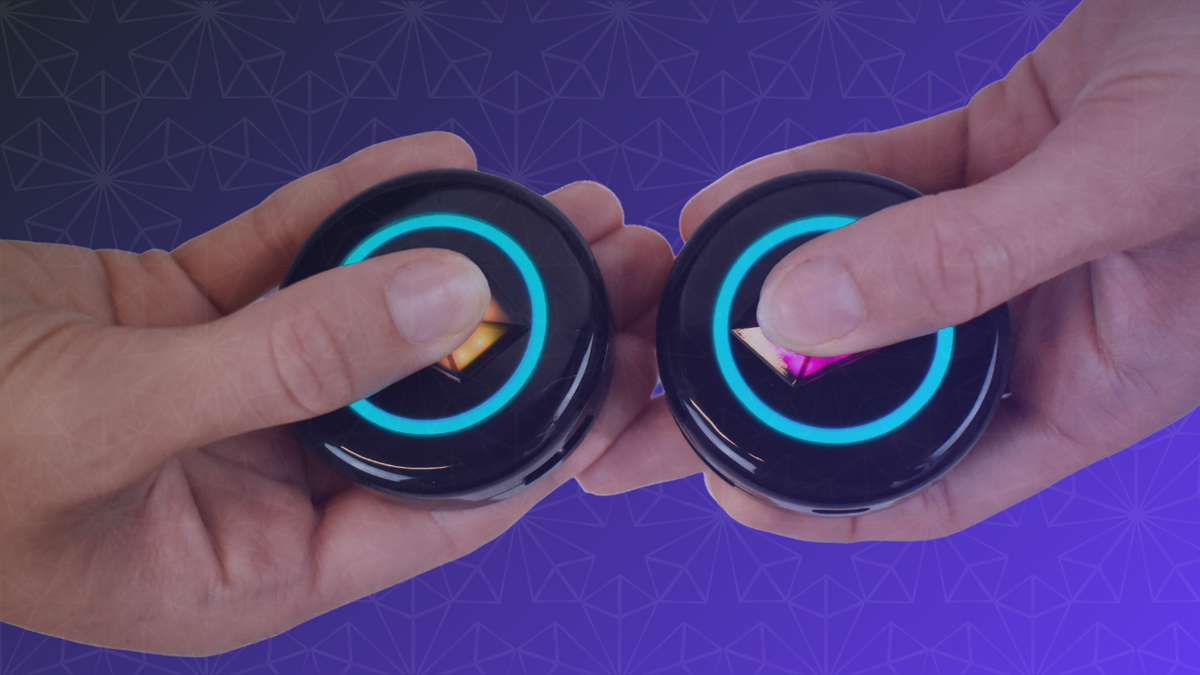
To Bond two Totem Compasses, hold them tip to tip in Compass Mode and press and hold both Touch Crystals at the same time. A blue ring fills, shows the color of your new Bond, and collects into the Touch Crystal. That’s it: you’re Bonded. Got a whole crew? Smart Groups let you Bond everyone at once, and the steps are below.
In Totem vernacular, “Bonding” means pairing: connecting your Totem Compass with a friend’s so each one can point toward the other. Once you’re Bonded, you can find each other by following the lights, without relying on cell service. With current software, each Compass can hold up to 8 Bonds.
Here’s a universal truth, regardless of who you are or where you come from: we crave connection. We want to share experiences with the people we love, old friends and new ones, and feel the joy of being on the same wavelength. The Totem Compass is a screen-free wearable built for exactly that, and it’s now used by 67,000+ people in 80 countries.
This guide covers everything you need to know about Bonding: what to do before you start, how to Bond one friend or a whole group, how Bond colors work, and what to do if a Bond doesn’t take.

To Bond, press and hold both Touch Crystals at the same time.
Before You Bond: A Quick Checklist
Most of the Totem Compass’s functionality lives in one button, the Touch Crystal, right at the center of your Compass. It’s the button you’ll use to Bond. Before you press it, check these:
- Both Totems are on. Click the Power Button on the back once to turn a Totem on.
- Both Totems are in Compass Mode. Pick up your Totem and hold it horizontally. You’ll know you’re in Compass Mode when the Halo (the ring of light around the edge) shows your Bond Lights, or a single white light if you haven’t Bonded with anyone yet.
- Everyone is on the latest software. Update every Totem in your group before you go, so everyone has the same features. The easiest way is the free Totem Compass App over Bluetooth, and our Version 5.0 post explains how.
What you don’t need: cell service, Wi-Fi, your phone, or a satellite fix. Bonding happens directly between the two Totems, so you can do it indoors, in a tent, or at the kitchen table the night before you leave.

What your Totem looks like in Compass Mode.
How to Bond Two Totem Compasses (One Friend at a Time)
- Hold both Totems horizontally so they’re in Compass Mode.
- Bring them together so they’re almost touching, about an inch apart. We recommend going tip-to-tip 😉
- Press and hold the Touch Crystal on both Totems at the same time.
- Watch the Halo. It fills with a ring of blue light and begins to pulse. Two pulsing Totems next to each other will recognize each other and Bond.
What You’ll See When the Bond Works
Once you successfully Bond, the Halo changes to show the color of your new Bond. Then it collapses to a single point and gets collected into the Touch Crystal. It’s a very satisfying animation, and one of our favorite parts of the whole user interface. (Quantum nerds: yes, a ring of possibilities collapsing into one light is basically the double-slit experiment. You’re welcome. 😘)
Don’t worry if your friend’s light doesn’t appear on the rim right away. When a Bonded friend is close, their light shows in your Touch Crystal instead of on the Halo, and right after Bonding they’re about as close as it gets. Once you move apart, their light moves out onto the Halo and you can start navigating.

Totems play a short animation when a Bond is complete.
How to Bond Your Whole Group at Once With Smart Groups
Smart Groups are Totem’s group Bonding feature. Instead of pairing off two at a time, your whole crew Bonds together in one process, straight from the official Totem Playbook:
- Get everyone together. Hold or place all the Totems side by side, horizontally.
- Pick a leader. Choose one Totem to be the Primary Totem.
- Begin Bonding. Touch and hold the Primary Totem’s Touch Crystal for 8 seconds, until its ring starts flashing through colors.
- Add the rest. Touch and hold each remaining Totem’s Touch Crystal until it shows the same flashing colors.
- Lock it in. Touch and hold the Primary Totem’s Touch Crystal one final time to finish Bonding.
You’ll know it worked when every Touch Crystal locks into place with its own unique color, and all the Bond lights move into the Touch Crystal (because everyone is right next to each other). If it doesn’t work, turn off all the Totems and start again, or Bond individually instead.
The best part: each person’s locked-in Crystal color becomes their Bond color on every Compass in the group. If Maya’s Crystal is green, Maya is green on everyone’s Totem. No memorizing required.
One thing to know before you start: creating a Smart Group replaces the Bonds that are already on those Totems. If you want to keep an existing Bond with someone outside the group, you can add them back one at a time afterward.
Watch a Smart Group being set up in about a minute and a half.
For big groups, color tips, and how Smart Groups compare with one-at-a-time Bonding, see our guide to 8 Bonds and Smart Groups.
How Totem Bond Colors Are Assigned
Each Bond gets its own color, so you know which light belongs to which friend. How that color is chosen depends on how you Bonded:
- One friend at a time: colors follow the order you Bond. Your first four Bonds are always Pink, Green, Blue, and Yellow, in that order. That means you might be Pink on one friend’s Compass and Yellow on another’s.
- Smart Groups: everyone’s Bond color matches their locked-in Touch Crystal color, on every Compass in the group.
- In the Totem Compass App: you can name each Bond and choose its color yourself.
Our guide to Bond Lights and Colors covers every color rule and what each light is telling you.
How to Check Which Color a Friend Is
Forgot who’s who? Hold your Totems next to each other and your Touch Crystal will show the color of that Bonded friend. We call it the Crystal Check, and you can do it as often as you need to.

Bring two Bonded Totems together to check each other’s Bond color.
What the White Light Means
If you don’t have any Bonds yet, you’ll see a single white light that points to magnetic North. We call it your North Light. That’s right, your Totem works as an old-fashioned compass too. 🧭
How Many Friends Can You Bond With?
With current software, each Totem Compass can Bond with up to eight other Compasses. If your Compass still tops out at four, it’s time for a software update.
Bonds don’t form a hard-paired circle, so a big group can spread its Bonds around and make sure nobody gets left out. For example, John could Bond with Alli and Tim, but Alli and Tim don’t have to Bond with each other. Tim could Bond with John, Elayne, and Rand. Meanwhile, Alli could Bond with John, Gwynneth, and Sam. Spreading your Bonds creates a daisy chain where everyone is findable by someone.

Spread your Bonds around so nobody gets left out.
Totem Bonding FAQ
Can I Bond with my whole group at the same time?
Yes. Use Smart Groups (steps above) to Bond the whole group in one process. You can still Bond one friend at a time whenever you like.
Will I lose my Bonds if I turn my Totem Compass off?
No. Your Totem remembers its Bonds when it turns off or the battery dies. In theory, you could Bond with a friend at a festival and find them again at the same festival a year later. The only thing that can break a Totem Bond is YOU!
Since Version 5.0, a Bond that hasn’t shared an updated location in a while collects into your Touch Crystal and pulses, so the lights on your rim stay focused on friends with current locations. The Bond isn’t deleted, and it comes back once that Compass is active again.
Do I need cell service, Wi-Fi, or the app to Bond?
No. Bonding happens directly between Totems using the Touch Crystal. Totems share their locations through encrypted messages, and Bonding is what tells your Compass which messages to read and lead you to. The free Totem Compass App adds extras like Bond names, custom colors, and maps, but you don’t need it to Bond.
Can someone Bond with my Totem Compass without my consent?
Bonding is designed to be deliberate. Two Compasses have to be about an inch apart, and both Touch Crystals have to be pressed and held at the same time, so a Bond can’t happen by accident or from across a crowd. Our guide to managing your Totem Bonds explains how Bonds are secured, and how to change or remove one.
What should I do if my Totems won’t Bond?
- Make sure both Totems are on and held horizontally in Compass Mode.
- After tilting into Compass Mode, wait a couple of seconds for the Touch Crystal to brighten before pressing it.
- If the Touch Crystal stops responding, tilt your Totem vertically and then back to horizontal to reset it, and try again.
- For a Smart Group that doesn’t take, turn off all the Totems and restart the process, or Bond individually.
- Still stuck? Our team is here to help, by humans, at tribe@totemlabs.com or by text at +1 423-522-1990.
Getting Totem Compasses for Your Group
Bonding is more fun with more people. If your crew is getting Totems together, the Totem Compass Bundle builder lets you customize the best Bundle for your group size, for up to eight people. The bigger the group, the lower the price per person.
- Standard Bundle: a Totem Compass, a Skin, and charging for every person in your group.
- Premium Bundle: everything in the Standard Bundle, plus a necklace for everyone.
And nobody has to front the whole bill. At checkout, you can split the payment with friends using Paysquad, so everyone chips in their share directly.
The Totem Compass: A Tool for Love
Love is more than just a word for us at Totem. It’s a core principle that guides everything we do. 💗
Learning how to Bond your Totem Compasses helps you stay connected and share life’s most beautiful experiences together, no matter how big the crowd or how far the journey.
Because in the end, it’s not just about finding your way. It’s about finding your people.
Build your group’s Totem Bundle →
Already have your Totems? Grab the Totem Quick Start guide and Bond your group before you go.